


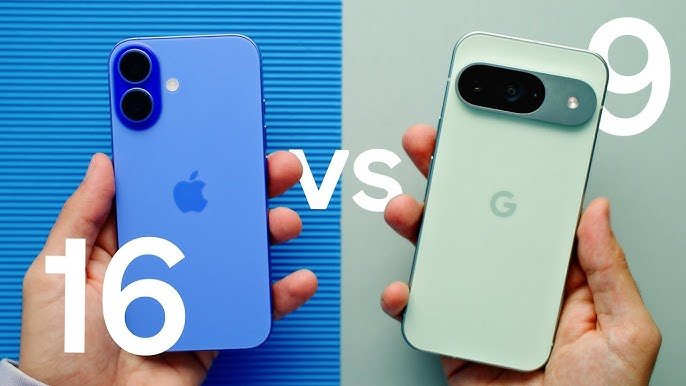
ఐఫోన్ నుంచి Google Pixel 10కి మారాలనుకుంటున్నారా? డేటా ట్రాన్స్ఫర్ ఎలా చేయాలో తెలుసుకోండి
Google Pixel 10 ఇప్పుడు మార్కెట్లోకి వచ్చింది. మీరు iPhone వాడుతున్నా, కొత్తగా Pixel 10 కొనాలని ఆలోచిస్తున్నారా? అయితే, మీ డేటాను సులభంగా, ఎలాంటి సమస్యలూ లేకుండా కొత్త ఫోన్కి మార్చుకోవచ్చు.
ఇప్పటి వరకు iPhone వాడుతున్న చాలా మంది, Pixel 10 సిరీస్ విడుదలతో దానిపైనే ఆసక్తి చూపిస్తున్నారు. Google Pixel 10లో iPhoneకి సమానమైన ఫీచర్లు ఉండడమే కాకుండా, మరిన్ని అదనపు ప్రయోజనాలు కూడా ఉన్నాయి. అందుకే Google, iPhone నుంచి Pixel 10కి మారే వినియోగదారుల కోసం డేటా ట్రాన్స్ఫర్ ప్రక్రియను చాలా సులభంగా చేసేసింది.
Google Store ద్వారా Pixel 10 ఆర్డర్ చేసిన వారికి, డెలివరీకి ముందే Google గైడ్లైన్స్ పంపుతోంది. ఇందులో, కాంటాక్ట్స్, ఫోటోలు, పాస్వర్డ్లు, డిజిటల్ వాలెట్ వంటి ముఖ్యమైన డేటాను Google ఖాతాలోకి బ్యాకప్ చేసుకోవచ్చు. ముందే బ్యాకప్ చేయడం వల్ల, ఫోన్ చేతికి వచ్చిన వెంటనే సెటప్ ప్రక్రియ వేగంగా పూర్తవుతుంది.
Read also : [irp posts=”4114″ ]
డేటా ఎలా ట్రాన్స్ఫర్ చేయాలి?
Pixel 10 చేతికి వచ్చిన తర్వాత, దాదాపు 30 నిమిషాల్లో డేటా ట్రాన్స్ఫర్ పూర్తవుతుంది. iPhoneను Pixelకి కేబుల్ ద్వారా కనెక్ట్ చేసి, స్క్రీన్పై చూపిన సూచనలను అనుసరించాలి. ఈ ప్రక్రియలో మీరు ట్రాన్స్ఫర్ చేయగలిగే డేటా:

– ఫోటోలు, వీడియోలు
– కాంటాక్ట్స్
– మెసేజ్లు, iMessages
– WhatsApp చాట్స్
– నోటిఫికేషన్లు
– కాల్ హిస్టరీ
– అవసరమైన యాప్లు
ప్రారంభ సెటప్ తర్వాత, iCloudలో ఉన్న అదనపు ఫోటోలను కూడా Google Photosకి తరలించవచ్చు. ఇలా అన్ని జ్ఞాపకాలు ఒకే చోట ఉండేలా చేయవచ్చు.
యాప్లు, సబ్స్క్రిప్షన్లు
చాలా యాప్లు ఈజీగానే ట్రాన్స్ఫర్ అవుతాయి. కానీ Spotify, Apple Music వంటి సబ్స్క్రిప్షన్ ఆధారిత యాప్లకు మళ్లీ సైన్ ఇన్ చేయాల్సి ఉంటుంది. కొన్ని చెల్లింపు యాప్లు వెంటనే బదిలీ కాకపోవచ్చు — ఇది డెవలపర్ విధానాలపై ఆధారపడి ఉంటుంది.
FaceTime, మెసేజింగ్, వీడియో కాల్స్
ఫోన్ మార్చుకున్నా, iPhone వినియోగదారులతో కనెక్షన్ కోల్పోరు. Apple RCSని స్వీకరించడంతో, మెసేజ్లు పంపడం, రీడ్ రిసీట్లు, ఎమోజీలు రెండింటి మధ్య పనిచేస్తాయి. అయితే Pixel 10 నుంచి FaceTime కాల్ ప్రారంభించలేరు — కానీ FaceTime లింక్ అందితే కాల్లో చేరవచ్చు. Google Meet, WhatsApp, Messenger వంటి యాప్లు వీడియో కాల్స్కు మంచి ప్రత్యామ్నాయాలు.
Read also : [irp posts=”4021″ ]
ఇతర ఫీచర్లు
Google Maps ద్వారా లొకేషన్ షేరింగ్ సజావుగా కొనసాగుతుంది. Pixel 10లో Clear Calling అనే ఫీచర్ ఉంది — ఇది కాల్ సమయంలో బయటి సౌండ్ తగ్గిస్తుంది. అలాగే, iPhoneలో తీసిన ఫోటోలపై కూడా పనిచేసే Google ఫోటో ఎడిటింగ్ టూల్స్ అందుబాటులో ఉన్నాయి.

కొత్త ఫోన్ — కొత్త ప్రారంభం
కొత్త ఫోన్కి మారడం అనేది డిజిటల్ జీవితాన్ని క్లీన్ చేసుకుకోవడం కూడా. అవసరం లేని ఫోటోలను తొలగించవచ్చు, కాంటాక్ట్ వివరాలను అప్ డేట్ చేసుకోవచ్చు. అవసరమైన యాప్లను మాత్రమే ఎంపిక చేసుకోవచ్చు.